Wednesday September 5, 2007
Good evening! I'm back with more info and fun for this fine late-summer night. The topic for tonight is music and the focus will be on music theory. I recently got a refresher course on musical scales during my weekly piano lesson with my niece Anna, and that reminded me of how useful the simple scales can be. The C major scale can be played on a piano or keyboard using all the white keys. Most of us are familiar with the 7 note sound of the major scale. You can also play an A minor scale by using the same white keys and starting on “A”. The tone changes from cheery and bright to dark and serious when you change modes from major to minor. If you play up and down the black keys on a piano/keyboard, then you're able to play a major or minor pentatonic scale. The pentatonic scale is so called because it has just 5 notes. One use of pentatonic scales is in Blues/Rock improvisation. An aspiring lead guitar player will often learn a set of “box” patterns for playing major/minor pentatonic scales, which can then serve as the basis for creating guitar riffs or solos. This has just been a brief taste of the scales. Scales are a topic of sufficient breadth and depth, that entire books have been written about them. I'll leave off until some future post to discuss more about the humble yet oft-employed scale.
There's no picture this week. Instead I've uploaded a short video from a summer day at the beach.
The loops of the week are still on hold while I search for another place to store them. Let me know if there are any good hosting services to recommend.
The site of the week is a gallery of 3D computer generated artwork at the CG society.
And that's about it for this week. I'll be back in roughly a week with more good stuff to share.
Send your comments and feedback and I’ll read it all and respond to some of it.
Bye for now!
Tuesday, August 28, 2007
Tuesday August 28, 2007
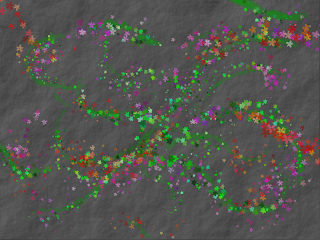
Hello and welcome back! The days of late August and the tail end of summer have been filled with heat and high temps. I've been staying cool and chugging lots of cool water, and other drinks. The topic for this week is graphics, and the program of the moment is Project Dogwaffle. I've written in past posts about this nifty free program but I've only really scratched the surface. This time out I'll talk more about creating a simple picture from scratch. For this example we'll make a green vine with flowers over a background that looks like stone. I started with a new blank page, at 800x600 resolution. From the “Filter” menu select “Render” and then “Plasma Noise”. Keep the default setting of 7 iterations and press “Go”. You'll get a nice pattern ranging from dark to light with slight variation. Now we'll copy the pattern to the swap buffer. You can think of the swap buffer in PD as a holding area that is the same size as the picture you're working on. From the “Buffer” menu select “Copy to Swap”, to copy the current picture to the swap buffer. Now select “Clear” from the buffer menu to clear the current screen to white. The white color is a bit too light, so we'll make it a more appropriate gray. In the tool panel, right click on the paint brush icon, and select “Simple”, and “Single”. Now we'll select a nice dark gray color from either the the black-to-white gradient or the tiled colors in the tool panel, by left clicking on it. The black rectangle in the tool panel will change color to whatever shade you selected. Now select the fill icon in the tool panel, and left click anywhere on white expanse of the current screen. If all went well you'll have a solid gray rectangle instead of the white one. At this point we're ready to apply a bit of texture, and make it look more like rock than a flat wall. From the “Filter” menu select “Emboss by Swap”. Press the “Top Left” button and press “OK” and a nice texture will be applied to the flat gray surface. The plasma noise pattern that we made back at the top has been used as a height map with the white or dark regions representing different depths. The result is a cool looking bumpy surface. Now we'll draw some vines and leaves and flowers over the background. Select a green color, by left clicking on the palette in the tool panel. Now we'll choose a paint tool by right clicking on the paint brush icon in the tool panel and select “Pastels”, and “Soft pastels”. Use the mouse to draw some gentle green curves. Now right click on the paint brush icon in the tool panel, and select “Organic effects”, and “Leafy 2”. This brush produces a variety of small leaves with each stroke. Add some leaves to the green curves to make them look like vines. We're almost done with the picture now. The last step will be to add some flowers. Select a contrasting color from the palette in the tool panel. In this case a red or orange or magenta will work well. Now right click on the paint brush icon, and select “Organic effects” and “Flowery”. The flower brush works in a similar manner to the leafy brush. Draw some flowers on and around the green vines using the mouse and holding down the left button. There we go. A finished picture in less time than it takes to make hummus. You can save your completed painting in TGA or BMP format by selecting “Save” from the “File” menu. We'll try out some other features of PD in a future post.
Here's my finished PD painting:
Click on a picture to get the full-sized view.
The loops of the week are still on hold while I search for another place to store them.
The website of the week is a Czech Radio page featuring MP3 and FLAC recordings of Bach's Brandenburg Concertos performed on period instruments. Go there and get your Baroque fix.
Send your comments and feedback and I’ll read it all and respond to some of it. Bye for now!
Hello and welcome back! The days of late August and the tail end of summer have been filled with heat and high temps. I've been staying cool and chugging lots of cool water, and other drinks. The topic for this week is graphics, and the program of the moment is Project Dogwaffle. I've written in past posts about this nifty free program but I've only really scratched the surface. This time out I'll talk more about creating a simple picture from scratch. For this example we'll make a green vine with flowers over a background that looks like stone. I started with a new blank page, at 800x600 resolution. From the “Filter” menu select “Render” and then “Plasma Noise”. Keep the default setting of 7 iterations and press “Go”. You'll get a nice pattern ranging from dark to light with slight variation. Now we'll copy the pattern to the swap buffer. You can think of the swap buffer in PD as a holding area that is the same size as the picture you're working on. From the “Buffer” menu select “Copy to Swap”, to copy the current picture to the swap buffer. Now select “Clear” from the buffer menu to clear the current screen to white. The white color is a bit too light, so we'll make it a more appropriate gray. In the tool panel, right click on the paint brush icon, and select “Simple”, and “Single”. Now we'll select a nice dark gray color from either the the black-to-white gradient or the tiled colors in the tool panel, by left clicking on it. The black rectangle in the tool panel will change color to whatever shade you selected. Now select the fill icon in the tool panel, and left click anywhere on white expanse of the current screen. If all went well you'll have a solid gray rectangle instead of the white one. At this point we're ready to apply a bit of texture, and make it look more like rock than a flat wall. From the “Filter” menu select “Emboss by Swap”. Press the “Top Left” button and press “OK” and a nice texture will be applied to the flat gray surface. The plasma noise pattern that we made back at the top has been used as a height map with the white or dark regions representing different depths. The result is a cool looking bumpy surface. Now we'll draw some vines and leaves and flowers over the background. Select a green color, by left clicking on the palette in the tool panel. Now we'll choose a paint tool by right clicking on the paint brush icon in the tool panel and select “Pastels”, and “Soft pastels”. Use the mouse to draw some gentle green curves. Now right click on the paint brush icon in the tool panel, and select “Organic effects”, and “Leafy 2”. This brush produces a variety of small leaves with each stroke. Add some leaves to the green curves to make them look like vines. We're almost done with the picture now. The last step will be to add some flowers. Select a contrasting color from the palette in the tool panel. In this case a red or orange or magenta will work well. Now right click on the paint brush icon, and select “Organic effects” and “Flowery”. The flower brush works in a similar manner to the leafy brush. Draw some flowers on and around the green vines using the mouse and holding down the left button. There we go. A finished picture in less time than it takes to make hummus. You can save your completed painting in TGA or BMP format by selecting “Save” from the “File” menu. We'll try out some other features of PD in a future post.
Here's my finished PD painting:
Click on a picture to get the full-sized view.

The loops of the week are still on hold while I search for another place to store them.
The website of the week is a Czech Radio page featuring MP3 and FLAC recordings of Bach's Brandenburg Concertos performed on period instruments. Go there and get your Baroque fix.
Send your comments and feedback and I’ll read it all and respond to some of it. Bye for now!
Wednesday, August 15, 2007
Wednesday August 15, 2007
Belated greetings once more! I've been away from the blog dealing with a few personal issues for a couple weeks, so I hope that my meager readership hasn't lost interest and jumped ship. The last time I was here I was in the midst of a big computer game programming project. I felt that project was breaking too far away from my original intent to keep the focus of this blog on the arts. It seems that Mark's Digital Arts had strayed too far into the realm of technology. I've decided to launch a separate site that will deal with Game Programming in Euphoria, since I'm a devotee of that language. I'll find some more music, art, and writing related topics to share in future posts, and save the programming topics for the other page. In the meantime I have another true story to share that transpired during the last week.
Bella is a red parrot of the genus Eclectus, who lives with my good friends Frank and Martha. She has become something of a celebrity in my apartment building and she is an unofficial mascot to all the tenants. She's only 3 years old, and has never had her wings clipped, preferring to stay near home and eat sunflower seeds and fruit. On the evening of August 1st Bella flew the coop, straight over the gate and into the wider world. It might be that her instinct to fly overrode her need for the security and comfort of home. Any caged bird must feel the pull of the skies and tall trees and wind. With Bella's departure, a kind of dark cloud settled over the apartments. Nothing seemed to work out right and Murphy's Law prevailed. I was already fighting a bit of depression and I found myself threatening to founder. They say that the one best thing about hitting bottom is that the only way to go is up. Hope was restored when a single feather was found on her cage, which had been left out in the courtyard with food and toys. That Sunday, August 5th I got up early, and went down to the courtyard and was greeted by the most beautiful sight in the world. Bella was home after her 4 day odyssey, tired and hungry and worn, but safe. She found a kindly couple a couple of towns away, and literally landed on the shoulder of the man. It took a call to the shelter and then a relieved family was reunited and whole again. The story might well have ended there, but for an almost incredible change in personal fortunes. The restoration of Bella to her perch brought luck, prosperity and balance. I don't know if it's Karma, providence or the Force, but something clicked back into place the moment Bella was home. For now I'm simply basking in the good vibes and pulling my own life back onto its path. It takes a little loss to realize what truly is important in life and what we can or can't do without. The most important are the family and loved ones that fill our lives and enable us to get on with whatever else life requires.
This is Bella!
Click on a picture to get the full-sized view.

 That's about it for this week.. I'll be back next time with some fresh content and a renewed focus on art and the other oddities of life.
Send your comments and feedback and I’ll read it all and respond to some of it.
Bye for now!
Belated greetings once more! I've been away from the blog dealing with a few personal issues for a couple weeks, so I hope that my meager readership hasn't lost interest and jumped ship. The last time I was here I was in the midst of a big computer game programming project. I felt that project was breaking too far away from my original intent to keep the focus of this blog on the arts. It seems that Mark's Digital Arts had strayed too far into the realm of technology. I've decided to launch a separate site that will deal with Game Programming in Euphoria, since I'm a devotee of that language. I'll find some more music, art, and writing related topics to share in future posts, and save the programming topics for the other page. In the meantime I have another true story to share that transpired during the last week.
Bella is a red parrot of the genus Eclectus, who lives with my good friends Frank and Martha. She has become something of a celebrity in my apartment building and she is an unofficial mascot to all the tenants. She's only 3 years old, and has never had her wings clipped, preferring to stay near home and eat sunflower seeds and fruit. On the evening of August 1st Bella flew the coop, straight over the gate and into the wider world. It might be that her instinct to fly overrode her need for the security and comfort of home. Any caged bird must feel the pull of the skies and tall trees and wind. With Bella's departure, a kind of dark cloud settled over the apartments. Nothing seemed to work out right and Murphy's Law prevailed. I was already fighting a bit of depression and I found myself threatening to founder. They say that the one best thing about hitting bottom is that the only way to go is up. Hope was restored when a single feather was found on her cage, which had been left out in the courtyard with food and toys. That Sunday, August 5th I got up early, and went down to the courtyard and was greeted by the most beautiful sight in the world. Bella was home after her 4 day odyssey, tired and hungry and worn, but safe. She found a kindly couple a couple of towns away, and literally landed on the shoulder of the man. It took a call to the shelter and then a relieved family was reunited and whole again. The story might well have ended there, but for an almost incredible change in personal fortunes. The restoration of Bella to her perch brought luck, prosperity and balance. I don't know if it's Karma, providence or the Force, but something clicked back into place the moment Bella was home. For now I'm simply basking in the good vibes and pulling my own life back onto its path. It takes a little loss to realize what truly is important in life and what we can or can't do without. The most important are the family and loved ones that fill our lives and enable us to get on with whatever else life requires.
This is Bella!
Click on a picture to get the full-sized view.

 That's about it for this week.. I'll be back next time with some fresh content and a renewed focus on art and the other oddities of life.
 Send your comments and feedback and I’ll read it all and respond to some of it.
Bye for now!
Friday, July 13, 2007
Friday July 13, 2007
A slightly belated Good Evening to all! I've been away doing a bit of reorganization, and preparing more content for the game project. Yea, yea, it's an excuse, but life if full of those and I'll try not to exploit them too much. The topic for this week is audio and focus will be on sounds and a short musical loop for our computer game project. Last week I went over the creation of some graphic elements, and in keeping with the theme and genre (simple puzzle game), I'm likewise going to stick to only a few choice sounds and a very brief bit of background music.
I used the Audacity sound editor for the sound effects. Audacity lets you generate a number of different tones, including saw, sine, or square waves, plucked string sounds, or random noise. You can then trim the sample down to a suitable length (I made mine about half a second), and apply a few effects and export it as a WAV. I made 3 samples to use as sound effects in the game and saved them as WAV files.
Click on the picture to get a full-sized view.

Right click on a name to download the WAV file.
---- Blip ---- Boop ---- Bump -----
Now let's see about a quick musical piece. My favorite “all in one” application for making music is Orion Pro. I created a series of patterns, little one-measure musical snippets, for 4 different chords; C, Em, Am, and F. I assigned 4 different software synthesizers to the each of patterns; A drum machine, vintage additive engine, bass emulator, and plucked string. I slowed the tempo down to about 110 BPM (beat per minute) to give it a less frenzied pace. Effects were applied, and the patterns were strung together (sequenced) into a short song of roughly a 1 minute duration. This rough mix was then exported using the “Stream to WAV” option.
Click on the picture to get a full-sized view.
We're almost through now. I used Sound Forge Studio to do the finishing steps on our song file. The main steps were adjusting the volume level using the “dynamics” and the “normalize” functions. I also applied a small amount of “reverb” to the song and exported to OGG (OggVorbis) format.
Click on the picture to get a full-sized view.

Right click on the song name to download the OGG song file.
----- Chroma -----
The name of the music file is also the name I've settled on as the title of our demo game. Chroma. That has a nice ring to it. And that's it for this week. Next time we'll have a look at the initial programming steps in Euphoria.
This game project has turned into something far larger than the original scope of this web log, and I'd like to know if my few but loyal readers find it the height of tedium or think I'm onto something. Would anyone want to see a more detailed version as an HTML document, going into the nuts and bolts of each of the steps I've briefly covered in the blog? How about a regular feature on a separate web page that exclusively delves into the in and outs of game design and implementation using free/cheap tools? Gimmie feedback folks and tell the old gray cat where next to go!
Send your comments and feedback and I’ll read it all and respond to some of it. Bye for now!
A slightly belated Good Evening to all! I've been away doing a bit of reorganization, and preparing more content for the game project. Yea, yea, it's an excuse, but life if full of those and I'll try not to exploit them too much. The topic for this week is audio and focus will be on sounds and a short musical loop for our computer game project. Last week I went over the creation of some graphic elements, and in keeping with the theme and genre (simple puzzle game), I'm likewise going to stick to only a few choice sounds and a very brief bit of background music.
I used the Audacity sound editor for the sound effects. Audacity lets you generate a number of different tones, including saw, sine, or square waves, plucked string sounds, or random noise. You can then trim the sample down to a suitable length (I made mine about half a second), and apply a few effects and export it as a WAV. I made 3 samples to use as sound effects in the game and saved them as WAV files.
Click on the picture to get a full-sized view.

Right click on a name to download the WAV file.
---- Blip ---- Boop ---- Bump -----
Now let's see about a quick musical piece. My favorite “all in one” application for making music is Orion Pro. I created a series of patterns, little one-measure musical snippets, for 4 different chords; C, Em, Am, and F. I assigned 4 different software synthesizers to the each of patterns; A drum machine, vintage additive engine, bass emulator, and plucked string. I slowed the tempo down to about 110 BPM (beat per minute) to give it a less frenzied pace. Effects were applied, and the patterns were strung together (sequenced) into a short song of roughly a 1 minute duration. This rough mix was then exported using the “Stream to WAV” option.
Click on the picture to get a full-sized view.

We're almost through now. I used Sound Forge Studio to do the finishing steps on our song file. The main steps were adjusting the volume level using the “dynamics” and the “normalize” functions. I also applied a small amount of “reverb” to the song and exported to OGG (OggVorbis) format.
Click on the picture to get a full-sized view.

Right click on the song name to download the OGG song file.
----- Chroma -----
The name of the music file is also the name I've settled on as the title of our demo game. Chroma. That has a nice ring to it. And that's it for this week. Next time we'll have a look at the initial programming steps in Euphoria.
This game project has turned into something far larger than the original scope of this web log, and I'd like to know if my few but loyal readers find it the height of tedium or think I'm onto something. Would anyone want to see a more detailed version as an HTML document, going into the nuts and bolts of each of the steps I've briefly covered in the blog? How about a regular feature on a separate web page that exclusively delves into the in and outs of game design and implementation using free/cheap tools? Gimmie feedback folks and tell the old gray cat where next to go!
| You Would Be a Pet Bird |
 You're intelligent and witty, yet surprisingly low maintenance. You charm people easily, and they usually love you a lot more than you love them. You resent anyone who tries to own or control you. You refuse to be fenced in. Why you would make a great pet: You're very smart and entertaining Why you would make a bad pet: You're not interested in being anyone's pet! What you would love about being a bird: Flying, obviously What you would hate about being a bird: Being caged |
Send your comments and feedback and I’ll read it all and respond to some of it. Bye for now!
Friday, June 22, 2007
Friday June 22, 2007
Greetings! The topic for this week is graphics and the focus will be on creating graphics for a computer game. Last week we started the the project and made some initial decisions about the type of game we'll make. The game we're working on is a simple puzzle game, so the graphics will likewise be clear yet limited. To begin with I created a gray background using Project Dogwaffle. Start by creating a new blank 32x32 square buffer, then use the “bumpy toy” tool from the filter/render menu. Then shift the picture, apply some noise and brush strokes, smooth it using “median”, and finally emboss it slightly. It takes a bit of effort, but if done carefully you can create an image that tiles nicely.
Click on the picture to get a full-sized view.
Now that we have a basic background we'll create the game pieces. It was a relatively simple matter to use Bryce to render a series of shiny colored balls. Create a sphere, then change the attributes (size and position), and material. Then move and rotate the camera to frame the ball and save the pic as a BMP file
Click on the picture to get a full-sized view.
Those graphical elements should suffice for our simple game. Next week we'll continue the game creation thread and make some sounds and music for the project.

The loops of the week were created using Orion Pro
Right click on a loop name to download it.
----- Bass 1----- Bass 2-----
----- Drums 1 ----- Drums 2 -----
----- Synth 1 ----- Synth 2 -----
Send your comments and feedback and I’ll read it all and respond to some of it. Bye for now!
Greetings! The topic for this week is graphics and the focus will be on creating graphics for a computer game. Last week we started the the project and made some initial decisions about the type of game we'll make. The game we're working on is a simple puzzle game, so the graphics will likewise be clear yet limited. To begin with I created a gray background using Project Dogwaffle. Start by creating a new blank 32x32 square buffer, then use the “bumpy toy” tool from the filter/render menu. Then shift the picture, apply some noise and brush strokes, smooth it using “median”, and finally emboss it slightly. It takes a bit of effort, but if done carefully you can create an image that tiles nicely.
Click on the picture to get a full-sized view.

Now that we have a basic background we'll create the game pieces. It was a relatively simple matter to use Bryce to render a series of shiny colored balls. Create a sphere, then change the attributes (size and position), and material. Then move and rotate the camera to frame the ball and save the pic as a BMP file
Click on the picture to get a full-sized view.

Those graphical elements should suffice for our simple game. Next week we'll continue the game creation thread and make some sounds and music for the project.

The loops of the week were created using Orion Pro
Right click on a loop name to download it.
----- Bass 1----- Bass 2-----
----- Drums 1 ----- Drums 2 -----
----- Synth 1 ----- Synth 2 -----
Send your comments and feedback and I’ll read it all and respond to some of it. Bye for now!
Tuesday, June 12, 2007
Tuesday June 12, 2007
Belated salutations. The entry for this week is late cause I’ve embarked on a long needed but all-too-brief trip to Australia. I’m currently in the city of Adelaide, which is located in the state of South Australia (closely adjacent to the grand state of bliss). What a remarkable world we live in when one day you can be enjoying the warming rays of a near-summer sunny day and the next gazing out on cold, crisp evening in early winter. It was a rather last-minute decision that leads me back to the southern hemisphere, but I’m here to scout out firsthand info on a possible (or highly probable) relocation here from my current gray cat’s loft.
The topic for this week is programming, and I’ve decided to forgo the usual structure of this log to document the creation of a small computer game over the next few weeks. We’ll go over everything from basic design through making the graphics and audio, to coding in weekly installments that should prove bite-sized and highly digestible. It will also be a learning experience for me, since I’m no seasoned pro when it comes to rolling my own games. Each week I’ll go over is some detail what steps to take, what tools I’ve used, and how far along in the overall project we are. The usual music, graphics and programming entries will relate to the building of our game. It’s a rather ambitious project, but most good things in this life make you sweat a bit. Will this be fun stuff? Of course! Some work? Yep! Shall we proceed? Make it so!
The first choice to be made in the game is what genre or type of game we want to make. For this project I think a puzzle game will offer the best mix of playability, challenge and relative simplicity to program.
The next step will be the choice of platform, or what type of hardware and computer OS we’re writing the game for. There is also the possibility of designing our game to be cross-platform (playable on many different platforms) though that has some special requirements. I’m limited to the choice between Windows XP, Suse Linux, and Palm OS. While I’m tempted to make a nice Palm game to play on my PDA most of my programming experience is in creating Windows applications so for let’s make this project a Windows game. We can approach the prospect of porting the game to another platform or platforms later.
Now that we have decided on a platform the next choice will be which programming language to use to create our game. Your choices may vary, but on my PC I have Java, Dev C++, FreeBASIC and Euphoria installed. This choice is a bit simpler, because I’m not versed in Java or C++ (yet), and of the 2 remaining choices I’ve far more experience with Euphoria. For this series, I’ll take the easier path and save the trailblazing into new programming realms for later. Euphoria is also nice because I can use my Euphoria header for the SDL graphics/multimedia library. That last bit of geek-speak will be clarified once we get to the actual programming phase of the project.
And that’s about it for this installment. Next week we’ll do the graphics design and start formulating the rules for our game.
That’s it for this week. The picture of the week and the loops will return next time.
Belated salutations. The entry for this week is late cause I’ve embarked on a long needed but all-too-brief trip to Australia. I’m currently in the city of Adelaide, which is located in the state of South Australia (closely adjacent to the grand state of bliss). What a remarkable world we live in when one day you can be enjoying the warming rays of a near-summer sunny day and the next gazing out on cold, crisp evening in early winter. It was a rather last-minute decision that leads me back to the southern hemisphere, but I’m here to scout out firsthand info on a possible (or highly probable) relocation here from my current gray cat’s loft.
The topic for this week is programming, and I’ve decided to forgo the usual structure of this log to document the creation of a small computer game over the next few weeks. We’ll go over everything from basic design through making the graphics and audio, to coding in weekly installments that should prove bite-sized and highly digestible. It will also be a learning experience for me, since I’m no seasoned pro when it comes to rolling my own games. Each week I’ll go over is some detail what steps to take, what tools I’ve used, and how far along in the overall project we are. The usual music, graphics and programming entries will relate to the building of our game. It’s a rather ambitious project, but most good things in this life make you sweat a bit. Will this be fun stuff? Of course! Some work? Yep! Shall we proceed? Make it so!
The first choice to be made in the game is what genre or type of game we want to make. For this project I think a puzzle game will offer the best mix of playability, challenge and relative simplicity to program.
The next step will be the choice of platform, or what type of hardware and computer OS we’re writing the game for. There is also the possibility of designing our game to be cross-platform (playable on many different platforms) though that has some special requirements. I’m limited to the choice between Windows XP, Suse Linux, and Palm OS. While I’m tempted to make a nice Palm game to play on my PDA most of my programming experience is in creating Windows applications so for let’s make this project a Windows game. We can approach the prospect of porting the game to another platform or platforms later.
Now that we have decided on a platform the next choice will be which programming language to use to create our game. Your choices may vary, but on my PC I have Java, Dev C++, FreeBASIC and Euphoria installed. This choice is a bit simpler, because I’m not versed in Java or C++ (yet), and of the 2 remaining choices I’ve far more experience with Euphoria. For this series, I’ll take the easier path and save the trailblazing into new programming realms for later. Euphoria is also nice because I can use my Euphoria header for the SDL graphics/multimedia library. That last bit of geek-speak will be clarified once we get to the actual programming phase of the project.
And that’s about it for this installment. Next week we’ll do the graphics design and start formulating the rules for our game.
That’s it for this week. The picture of the week and the loops will return next time.
Friday, May 25, 2007
Friday May 25, 2007
Hello again and welcome back. The topic for this week is graphics, and the focus will be on the creating your own cartoon characters. My software tool of choice for making 'toons is Anim8or, which aside from being a free program, has all the features you need to make your own characters. A good way to start is by building a figure out of primitives and simple shapes.
The samples below were created using Anim8or.
Click on a picture to get a full-sized view.

 Using Anim8or you can also add the element of motion to your carefully crafted figures. It takes some time and trying to make a real animation, but it's definitely a project worth doing. Give it a go!
The picture of the week was taken in Melbourne during my last trip there in April of 2006. I've always appreciated a good pun!
Click on the picture to get a full-sized view.

The loops of the week were created using Orion Pro
Right click on a loop name to download it.
----- Bass 1----- Bass 2-----
----- Drums 1 ----- Drums 2 ----- Drums 3 ----- Drums 4 -----
----- Synth 1 -----
Send your comments and feedback and I’ll read it all and respond to some of it. Bye for now!
Hello again and welcome back. The topic for this week is graphics, and the focus will be on the creating your own cartoon characters. My software tool of choice for making 'toons is Anim8or, which aside from being a free program, has all the features you need to make your own characters. A good way to start is by building a figure out of primitives and simple shapes.
The samples below were created using Anim8or.
Click on a picture to get a full-sized view.

 Using Anim8or you can also add the element of motion to your carefully crafted figures. It takes some time and trying to make a real animation, but it's definitely a project worth doing. Give it a go!
The picture of the week was taken in Melbourne during my last trip there in April of 2006. I've always appreciated a good pun!
Click on the picture to get a full-sized view.

The loops of the week were created using Orion Pro
Right click on a loop name to download it.
----- Bass 1----- Bass 2-----
----- Drums 1 ----- Drums 2 ----- Drums 3 ----- Drums 4 -----
----- Synth 1 -----
Send your comments and feedback and I’ll read it all and respond to some of it. Bye for now!
Subscribe to:
Posts (Atom)